
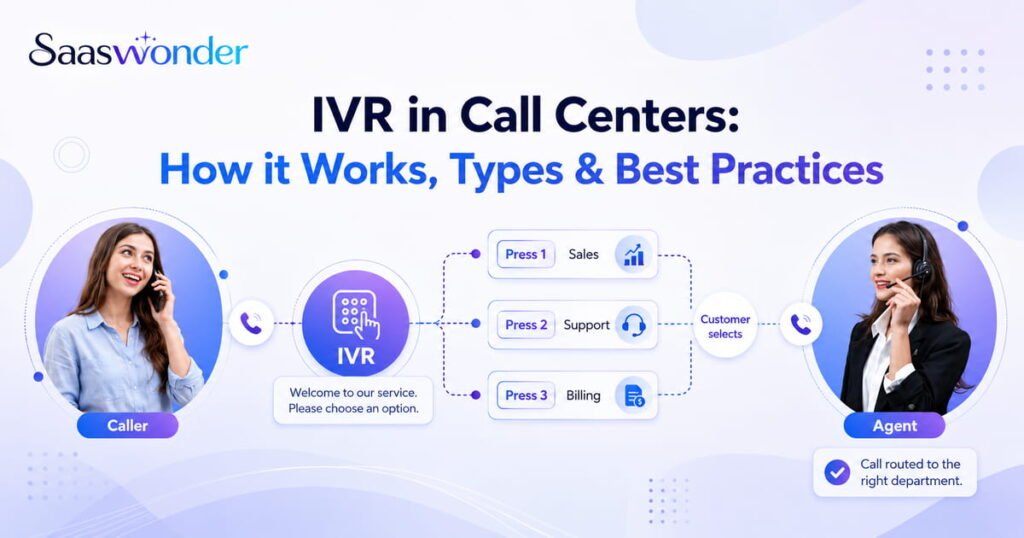
Efficient call handling is essential for any call center, yet many businesses still struggle with long wait times, frequent call transfers, and overwhelmed support teams. When customers cannot quickly reach the right department, their frustration increases, and so does the risk of losing them.
This is where an IVR (Interactive Voice Response) system becomes invaluable. IVR helps callers navigate menu options, route themselves to the correct team, and even complete basic tasks without speaking to an agent. With the right IVR setup, call centers can manage high call volumes, improve customer satisfaction, and streamline daily operations.
In this guide, you’ll learn what IVR is in a call center, how it works, the different types of IVR systems, and best practices to ensure your IVR delivers fast and frustration-free customer experiences.
Key Highlights
- IVR in a call center helps route customers to the right agent or department, reduces wait times, improves customer satisfaction, and allows agents to focus on complex issues.
- Call centers typically use several main types of IVR, including inbound, outbound, visual, self-service, and conversational IVR.
- A call center’s IVR works by greeting callers, presenting menu options, capturing their input via voice or keypad, and directing them to the appropriate agent.
- To make a call center IVR effective, keep menus short, use clear voice prompts, offer multiple languages, provide self-service options, and regularly monitor performance.
What is Interactive Voice Response (IVR) in a Call Center?
Interactive Voice Response (IVR) in a call center is an automated system that interacts with callers through voice commands or keypad inputs. It acts as a virtual receptionist, presenting menu options to direct callers to the appropriate agent, department or self-service option.
For example, when a customer calls a bank’s helpline, the IVR might say, “Press 1 for account balance, Press 2 for credit card services, or Press 3 to speak with an agent”. It allows calls to be handled quickly, reducing wait times and creating a smoother customer experience.
How Does IVR Work in a Call Center?
IVR works by automatically answering calls, greeting callers, presenting menu options, and routing callers to the right department or agent.
- Greeting Callers
When a customer calls, the IVR system answers with a greeting, for example, “Thank you for calling [Company Name]. Please select from the following options to reach the right department”. Greetings can be recorded manually or chosen from pre-built templates in your call center software. - Menu Navigation
After the greeting, the caller hears a menu of options, like “Press 1 for Billing, 2 for Technical Support”. The navigational menus can also use multi-level IVR to filter calls and direct customers to the appropriate agent or department, improving efficiency for both callers and agents. - Multi-input Options
Callers can interact with the IVR system in two main ways: Dual-Tone Multi-Frequency (DTMF)
or voice command.
Keypad Input (DTMF): The traditional numeric input method allows callers to navigate the menu by pressing numbers on their phone.
Voice Commands: Using speech recognition, callers can speak their request directly. The system confirms the input and routes the call accordingly. For example, if you request order tracking, the IVR will respond with “Did you say ‘track my order’? I’ll connect you to the delivery team”. - Efficient Routing
By using automatic call distribution (ACD), IVR directs calls to the right agent or self-service option. Calls can also be sent to voicemail, or callers can request a callback if agents are unavailable. - Agent Support
When the call reaches a live agent, the IVR shares important details like the customer’s name and reason for calling. By using call pop technology, the caller’s information appears instantly on the agent’s screen, helping them respond quickly and provide better service.
Types of IVR a Call Center Uses
The main types of IVR used in call centers include inbound, outbound, visual, self-service, and conversational IVR, each designed to improve call management and enhance customer experience.
- Inbound IVR
An inbound IVR system is designed to handle all incoming customer calls by presenting callers with a structured menu. It ensures that calls are automatically routed to the correct destination, reducing the workload on reception staff and preventing unnecessary call transfers.
Moreover, inbound IVRs can also be customized with queue messages, callback options, and after-hours announcements, ensuring customer support is available 24/7. It helps boost customer satisfaction and manage call center workload. - Outbound IVR
An outbound IVR system automates outgoing calls to customers by using pre-recorded messages and allows interaction through voice or keypad responses. It can automatically dial phone numbers from a list of leads or potential clients, making it easy to reach large audiences without live agents.
Outbound IVR is commonly used for appointment reminders, payment confirmations, surveys, or promotional campaigns. It improves customer engagement and retention by ensuring timely and consistent communication with clients. - Visual IVR
Visual IVR is an upgraded version of traditional IVR that shows menu options on a screen, such as a mobile app or website, instead of only using voice prompts. In this system, customers can see all available options at once and tap or click the ones they need, reducing confusion and shortening call times.
In most cases, customers access visual IVR by calling the business and receiving an SMS with a link. - Self-Service IVR
Self-Service IVR enables customers to complete tasks using voice commands or keypad input, without speaking to a call center agent. For example, customers can check account balances, make payments, or track orders, with real-time updates from connected databases.
By handling routine inquiries, self-service IVR reduces the workload for agents and provides 24/7 access to common services. Additionally, it also helps businesses lower operational costs. - Conversational IVR
A conversational IVR is an AI-powered system that uses natural language processing (NLP) to understand customer requests and respond appropriately. It allows callers to speak naturally instead of navigating through touch-tone menus.
For example, a caller might say, “Check my account balance” or “Report a problem with my order”. The conversational IVR can provide instant answers for simple requests or transfer the caller to the right agent for more complex issues.
What are the Benefits of IVR in Call Centers?
By using an IVR system, you can improve customer satisfaction, reduce wait times, ensure accurate call routing and increase agent productivity.
- Reduced Wait Times: By automating responses to common queries, IVR helps minimize hold times and allows customers to get instant assistance without waiting for an agent.
- 24/7 Availability: Even after business hours, callers can access information or complete simple requests through automated responses.
- Improved Call Routing: IVR systems ensure callers are directed to the right agent or department based on their needs, which helps reduce misrouted calls and improve first-call resolution (FCR).
- Increased Agent Productivity: Routine or repetitive calls are handled by the IVR system, allowing agents to focus on complex or high-value interactions that require human attention.
- Data Collection and Insights: IVR can gather valuable customer data, such as preferences or frequently selected options, which can be used to improve services and decision-making.
- Improves Data Collections
IVRs help collect users’ data on types of inquiries, the timing of calls, etc. Analyzing and studying these callers’ data becomes helpful for call centers when training their agents for better agent-customer interaction. A good agent-customer can lead to higher client retention. - Increases Customer Experience
IVR systems that use natural language can understand customers’ inquiries and provide them with the most appropriate information. They also help customers communicate with the desired available agents, ensuring no doubts remain unclear, improving the customer experience. - Reduces Waiting Time
During high call volumes, customers can be frustrated by waiting too long to get their inquiries answered. Hence, the IVR interacts with them when the agents are busy with another call. Additionally, a self-service IVR system allows customers to resolve the issues, reducing waiting times. - Enhances Availability
Using IVR in call centers allows customers to contact them at any point in time. Also, using cloud-based IVR systems, call centers can work remotely, increasing their availability regardless of location. Additionally, when agents are unavailable, using a proper IVR technique, IVR can provide automatic guidance to customer queries.
Best Practices for Effective IVR Usage in a Call Center
For an effective usage of IVR in a call center, you must follow IVR best practices, including making short menus, offering clear voice prompts, and a live agent option for better customer support.
- Keep the Menu Short and Simple: Limit options to the most important choices so callers can easily find what they need without getting confused.
- Use Clear and Friendly Voice Prompts: Record messages in a warm, polite tone using simple, easy-to-understand language. Keep your sentences short and avoid technical terms to make it clear for every caller.
- Always Offer a Live Agent Option: Give callers the choice to speak to an agent if their issue is too complex for automation. It improves satisfaction and builds trust.
- Keep IVR Menu Updated and Relevant: Regularly review your IVR scripts and menu options to reflect new services, departments, or business hours.
- Enable Multi-language Support: If your business serves customers from multiple regions, offer language options at the start of the call to enhance clarity and overall service quality.
- Live Representatives Option
Navigating many menu options can be frustrating, so most customers prefer talking with live representatives. Always add an option to speak with agents in the IVR menu. Furthermore, a sound IVR system should always offer live agents at any time. - Personalizing IVR
Use the data collected from the customers to personalize the IVR menus. Such personalization can be done using the customers’ name, phone number, type of inquiries, etc. Such changes improve customer interaction. Personalization can include setting the greeting message using their name, for instance, “Welcome Michael.“ - Routing Calls Properly
A call center IVR system must route calls to the best-suited agents. Try keeping the agents in multiple departments. With these various departments, customers can efficiently clear their doubts, resulting in higher customer satisfaction. For instance, if a customer wants to buy a product, the call should be routed to the sales department. - Optimizing the IVR Menus
Optimize your IVR menus regularly. You can update the menu based on customer reviews, data collection, and also through industry analysis and research. If your customers are from different regions, try adding their native language, including multilingual options. Additionally, as an automated voice, try using a person’s voice with a pleasant and soft tone.
Conclusion
IVR plays a critical role in call centers by automating routine interactions, reducing wait times, and ensuring callers reach the right department without unnecessary transfers. When set up correctly, it helps call centers manage high call volumes efficiently while giving agents more time to focus on complex customer issues.
However, the effectiveness of your IVR depends on having a reliable phone system that supports smart routing, flexible menu options, and seamless integrations.